


The Commission feature in SiteDude Booking allows administrators to set and manage commission rates for employees based on the services they provide. This feature helps track earnings and ensures accurate compensation for employees.
This feature is available on all SiteDude Booking plans.
Configuring Commission #
Commission tab will show you the list of all employees along with the number of their appointments, revenue they made, commission type, and earnings in a selected data range.
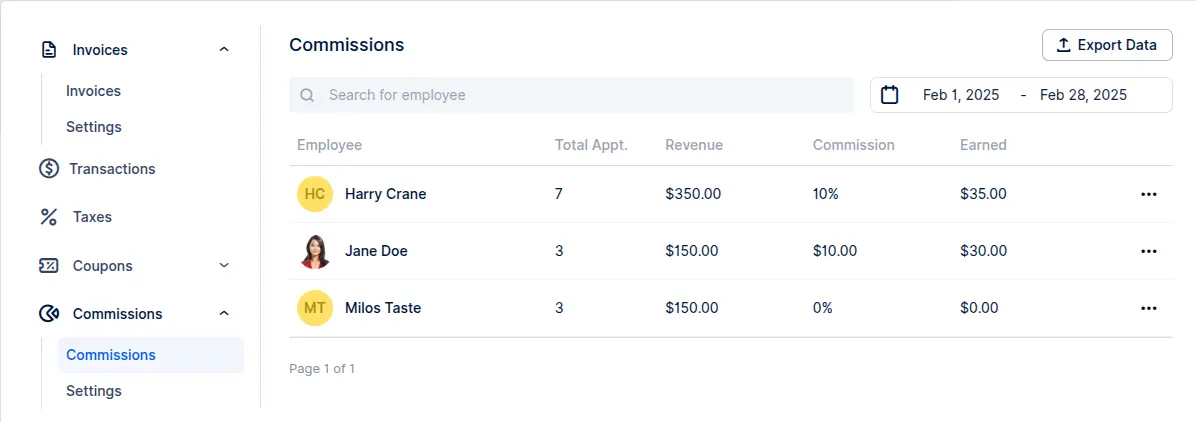
Clicking on the three dots next to each employee, you will be able to adjust custom commission for each employee and have more flexibility when it comes to employee earnings.
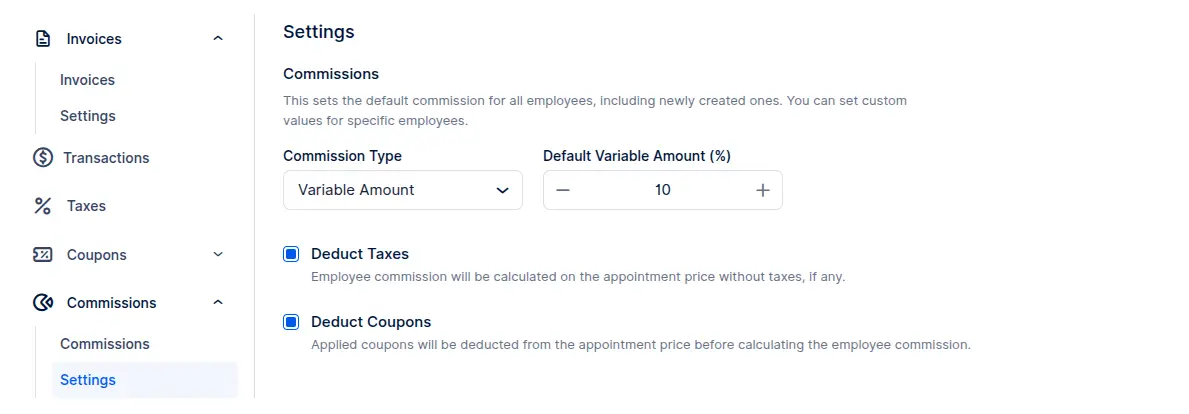
Under the Settings tab, you will be able to set a default commission rate for all existing and newly created employees.
You can choose between a variable amount in percentage or a fixed amount in the currency you are using ($, €, £, etc).
In case a variable amount is selected, there is an option to deduct tax and coupon value, if applicable.
If disabled: commission is calculated on $200
Deduct Taxes:
If enabled, the commission is calculated on the appointment price excluding taxes.
Example:
Appointment total: $110 (includes $10 tax)
If enabled: commission is calculated on $100
If disabled: commission is calculated on $110
Deduct Coupon:
If enabled, the commission is calculated on the discounted price (after applying the coupon).
Example:
Appointment price: $200
Applied coupon: $50
If enabled: commission is calculated on $150


