


A Favicon is an icon which is displayed on the browser tab. Let’s see how you can add it to your website. In order to add a favicon to your website, select in the Settings panel „Website“ section.
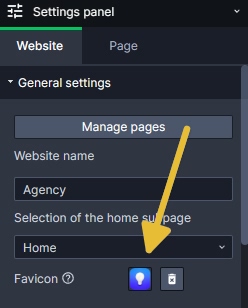
Keep in mind that a favicon is squared and if you add a rectangular graphics, it will get deformed.
- It’s good to know, that icons with transparent background are good-looking and the best for a Favicon. You can set transparent background, saving the favicon as .png file.
- The SiteDu.de builder automatically generates icons in proper sizes.


