


In the Advanced builder of SiteDu.de, you can set default parameters for all the basic text styles. What’s more, you can add your own style.
Available default text styles #
| Regular | Regular text |
| Header 1Header 2Header 3Header 4 | Headers h1,h2,h3,h4. More about Headers read here. |
| Link | Default links style on a website |
| Link Hover | Default links style on a website after hover |
| Header slider | Default header style on a website in sliders |
| Header gallery | Default header style on a website in galleries |
| Regular white | Regular text in white |
| Header newsfeed | Default header style on a website in newsfeeds |
| Date newsfeed | Default date style on a website in newsfeeds |
| Button | Default font style on a button |
Change a text style #
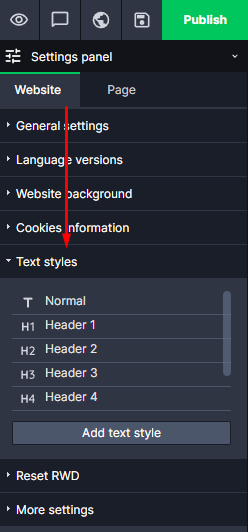
Every text style can be freely modified, for example, you don’t need to change the color of every new link on your website. All you have to do is to set a default links color. To modify a text style, go to the Settings panel, and here to the „Website tab“ and choose „Text styles“.
In addition, if you ever decide to change a color of default text on your website, you will not need to change it by hand thanks to text styles. All you have to do is to enter the Settings Panel and in Text Styles change a text color. Changes will automatically apply.
Add a new text style #
To add a new text style, go to the Settings Panel, enter Website and in „Text Styles“ select „Add text style“.

Enter a name for your new style and use the text editor where you can set style parameters. When you are done, save changes in the Settings Panel.


